
Why workflow matters for audio transcription
Audio transcription is not only about turning spoken words into text. It is also about building a smooth process from upload to final use. Many people focus on the transcription result itself, but the steps around it often make the biggest difference in speed and consistency. A clear workflow helps users save time, reduce repeated work, and keep transcripts organized across many projects. This is useful for students, researchers, creators, support teams, and businesses that handle audio every day. When a workflow is simple, users can move from raw recording to searchable, usable text with less effort. For a website that offers free AI audio to text conversion, workflow guidance can help visitors get more value from the tool and use it more often. Instead of treating each file as a separate task, users can create a repeatable routine that makes transcription part of a larger content or documentation process.
A good transcription workflow usually starts before the file is uploaded and continues after the transcript is complete. It includes naming files clearly, choosing the right audio source, checking file quality, uploading efficiently, reviewing the transcript, and storing the final text in a way that supports future access. Even basic habits can improve results. For example, a consistent naming system can prevent confusion when handling interviews, meetings, voice notes, lectures, or recorded calls. Saving both the original audio and the transcript in related folders makes future review easier. Users who work with large volumes of content benefit even more from structure because it lowers the chance of missing files or mixing versions. A practical workflow also helps teams collaborate, especially when one person records audio, another reviews the text, and another publishes or shares the final version.
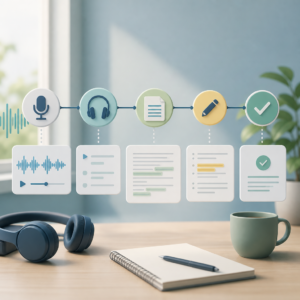
Steps to create a simple and repeatable process
The first step is to prepare incoming files in a predictable way. Before uploading audio for transcription, it helps to label files with useful details such as date, project name, speaker, or topic. A file named “team-meeting-2026-09-01” is much easier to track than one called “recording-final-new.” This small change improves organization right away. After naming the file, users should confirm that it plays correctly and has clear sound. Once the file is ready, the next step is to upload it and let the AI generate the transcript. After the transcript is created, users should scan it for major issues such as missing sections, unclear names, or speaker confusion. This review does not need to be long, but it should be part of every project. The final transcript can then be copied, downloaded, or moved into a document, notes app, content calendar, or internal archive depending on the goal.
It also helps to divide transcription work into stages. One stage is capture, which includes recording and collecting audio. The next is conversion, where the audio becomes text using AI. Then comes cleanup, where users correct obvious errors and improve readability if needed. The last stage is reuse, where the transcript is turned into something practical such as meeting notes, article drafts, study materials, captions, summaries, or searchable records. Thinking in stages makes the process easier to manage because each step has a clear purpose. This is especially useful when people work with different types of recordings. A lecture may need highlights and study notes, while a customer call may need action items and follow-up details. The transcript is the foundation, but the real value often comes from what users do after the text is ready. A clear process helps turn transcripts into useful outcomes instead of leaving them unfinished in a folder.
How to save time when handling many recordings
People who transcribe audio often deal with repeated tasks, and this is where workflow improvements can create real time savings. One useful method is to create templates for transcript review. For example, a user can keep a checklist that includes speaker names, dates, technical terms, punctuation, and action items. This avoids starting from zero every time. Another time-saving method is to group similar files together. A person handling weekly meetings can process all meeting recordings in one batch. A creator working on interviews can upload and review them in a consistent order. Batching reduces switching between different tasks and helps users stay focused. It is also useful to define the level of editing needed before starting. Not every transcript requires full polishing. Some files are only needed for quick reference, while others are meant for publishing. Matching the review effort to the final use can save a lot of time.
Storage and retrieval are just as important as transcription speed. If users cannot find transcripts later, much of the value is lost. A simple folder structure can solve this problem. One folder can hold raw audio, another can hold original transcripts, and another can hold final edited versions. Within those folders, subfolders can be arranged by project, month, client, team, or content type. Searchable naming is also important. Including keywords such as interview, webinar, lecture, support-call, or podcast can make future retrieval easier. For teams, a shared storage system with clear permissions can keep everyone aligned. It may also help to keep a small index document or spreadsheet that lists files, dates, topics, and transcript status. This is not complex to set up, but it can prevent duplicated work and make ongoing transcription projects much easier to manage over time.
Turning transcripts into more useful assets
One of the biggest advantages of a strong transcription workflow is that it helps users do more with the text after it is created. A transcript can become much more than a written copy of speech. It can support summaries, internal reports, content planning, learning materials, documentation, and knowledge sharing. For example, a business can turn recorded meetings into action lists and searchable records. A student can transform a lecture transcript into study notes with headings and key points. A marketer can use interview transcripts to pull out quotes, themes, and ideas for new content. The transcript becomes easier to reuse when it is stored properly and reviewed in a consistent format. Even basic cleanup, such as splitting long blocks of text into readable sections, can improve its long-term usefulness. This makes AI audio transcription valuable not only for fast conversion but also for better information management.
A complete workflow should also include a final quality check based on the purpose of the transcript. If the text is meant for private notes, a quick review may be enough. If it is meant for publishing, sharing with clients, or keeping as an important business record, a more careful review is better. The key is to create a process that is realistic and repeatable. Users do not need a complicated system to benefit from audio transcription. They need a routine that fits the way they work and helps them move from recording to useful text without delay. For a platform like audiototextfree.com, this topic fills an important gap because many users already know why transcription matters but may not know how to build an efficient process around it. A clear workflow supports better organization, faster output, and more practical use of every transcript created with AI.


